

搜索到
144
篇与
的结果
-
 开通支付宝当面付0.38%费率教程 支付宝当面付是帮助商家在线下消费场景下实现快速收款,当面付产品支持条码支付和扫码支付两种付款方式。而我们需要当面付一般都是在网上开通接口,进行网站收款执行回调。本文就来仔细介绍一下支付宝当面付收款申请步骤以及一些注意事项!其实在支付宝商家服务里直接也可以申请,大家可以去试一试!开通步骤:1、开通当面付申请的支付宝账户类型需要是经过实名认证的个人/企业支付宝账户2、进入支付宝开放平台 商户签约管理,点击新增商家3、然后需要输入我们要开通当面付的支付宝账号,可以是自己的也可以是别人的。(代开当面付其实就是在这里帮别人提交资料而已)4、然后选择开通当面付这个功能,有空的可以把花呗分期的也签约了。新号不支持签约花呗分期。5、然后我们填写商家资料就可以了,营业执照是非必填的。我们店铺招牌上传店铺的门头面,营业资质去上传店铺的内景。6、联系人信息务必填写正确,审核通过后会通过电子邮件和手机短信来通知的,费率输入0.38%即可。7、提交后在工作日等待半小时就会通过了,通过后需要登录邮箱进行签约。如果你是帮别人代开的就要叫他进行确认签约即可。当面付优点付款方式支持信用卡,花呗;付款后可获得支付宝积分;支持API接口对接收款当面付规则1、签约时未提供同名营业执照(营业执照主体与支付宝账户认证主体同名),收款将会受到一定的限制,具体限制规则为交易限额:单笔收款≤1000,单日收款≤5W,不区分借记或贷记渠道。2、签约时提供了同名营业执照,或者签约后补充了同名营业执照,收款不受限额。 您可以登录商家后台,进入我的产品,通过资质凭证补全来恢复正常的产品使用。
 -
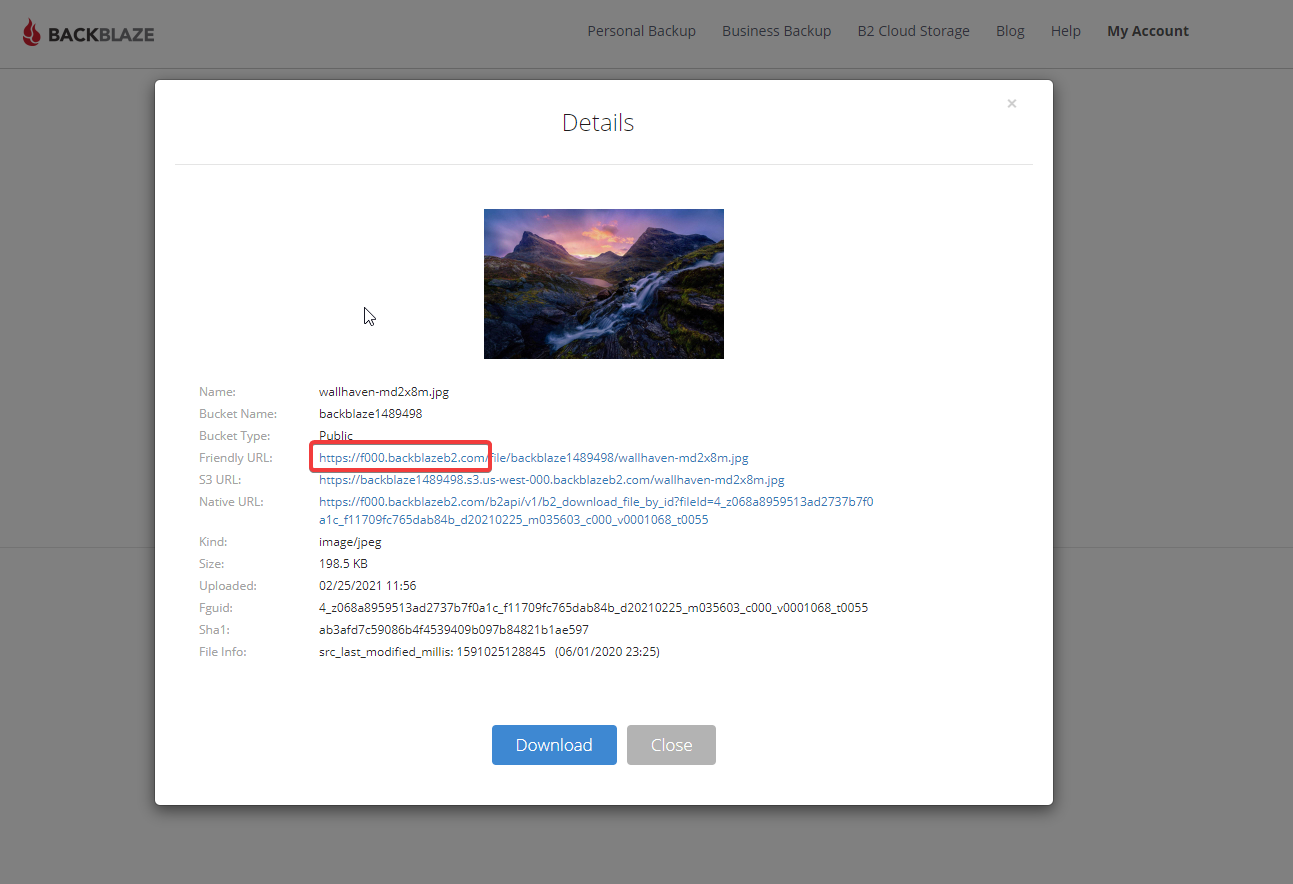
B2+cloudflare+ShareX,实现无成本图床和便捷上传 首先要准备好3个条件一个cloudflare账号 https://dash.cloudflare.com/一个B2账号 https://www.backblaze.com/b2/cloud-storage.htmlWindows软件ShareX步骤1、注册B2账号,点击进入B2 Cloud Storage,点击Buckets创建一个BUcket,设为public,并上传一个图片,记录下下图要用的域名2、点击App keys,添加一个新的key,bucket就选你刚创建的那个,记录下你的密钥,之后要在ShareX中用3、打开cf,cname一下上图要记的域名,小云朵点亮4、加一条页面缓存规则.5、创建一个workers,粘贴下列代码,记得b2domain和bucket的值改成自己的'use strict'; const b2Domain = 'img.domain.com'; // configure this as per instructions above const b2Bucket = 'bucket-name'; // configure this as per instructions above const b2UrlPath = `/file/${b2Bucket}/`; addEventListener('fetch', event => { return event.respondWith(fileReq(event)); }); // define the file extensions we wish to add basic access control headers to const corsFileTypes = ['png', 'jpg', 'gif', 'jpeg', 'webp']; // backblaze returns some additional headers that are useful for debugging, but unnecessary in production. We can remove these to save some size const removeHeaders = [ 'x-bz-content-sha1', 'x-bz-file-id', 'x-bz-file-name', 'x-bz-info-src_last_modified_millis', 'X-Bz-Upload-Timestamp', 'Expires' ]; const expiration = 31536000; // override browser cache for images - 1 year // define a function we can re-use to fix headers const fixHeaders = function(url, status, headers){ let newHdrs = new Headers(headers); // add basic cors headers for images if(corsFileTypes.includes(url.pathname.split('.').pop())){ newHdrs.set('Access-Control-Allow-Origin', '*'); } // override browser cache for files when 200 if(status === 200){ newHdrs.set('Cache-Control', "public, max-age=" + expiration); }else{ // only cache other things for 5 minutes newHdrs.set('Cache-Control', 'public, max-age=300'); } // set ETag for efficient caching where possible const ETag = newHdrs.get('x-bz-content-sha1') || newHdrs.get('x-bz-info-src_last_modified_millis') || newHdrs.get('x-bz-file-id'); if(ETag){ newHdrs.set('ETag', ETag); } // remove unnecessary headers removeHeaders.forEach(header => { newHdrs.delete(header); }); return newHdrs; }; async function fileReq(event){ const cache = caches.default; // Cloudflare edge caching const url = new URL(event.request.url); if(url.host === b2Domain && !url.pathname.startsWith(b2UrlPath)){ url.pathname = b2UrlPath + url.pathname; } let response = await cache.match(url); // try to find match for this request in the edge cache if(response){ // use cache found on Cloudflare edge. Set X-Worker-Cache header for helpful debug let newHdrs = fixHeaders(url, response.status, response.headers); newHdrs.set('X-Worker-Cache', "true"); return new Response(response.body, { status: response.status, statusText: response.statusText, headers: newHdrs }); } // no cache, fetch image, apply Cloudflare lossless compression response = await fetch(url, {cf: {polish: "lossless"}}); let newHdrs = fixHeaders(url, response.status, response.headers); if(response.status === 200){ response = new Response(response.body, { status: response.status, statusText: response.statusText, headers: newHdrs }); }else{ response = new Response('File not found!', { status: 404 }) } event.waitUntil(cache.put(url, response.clone())); return response; }6、workers里添加路由,使访问你的域名时,先走workers访问一下你的图片文件比如说一开始是https://f000.backblazeb2.com/file/backblaze1489498/wallhaven-md2x8m.jpg现在用https://dlcu.cf/wallhaven-md2x8m.jpg就可以访问了7、配置ShareX这个感觉没啥好说的,主页面–目标–上传目标设置–backblaze b2,填上就行了文章来自网络
-
-
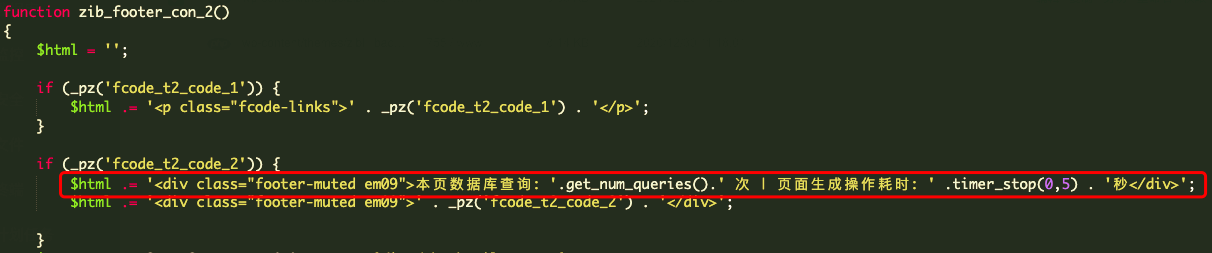
给WordPress子比zibll主题添加页面加载时间、数据库查询次数及内存占用 代码页面加载时间代码本页数据库查询:<?php echo get_num_queries(); ?> 次;数据库查询次数代码页面生成操作耗时:<?php timer_stop(0,5); ?> 秒; //精确到第五位小数点内存占用代码$ram .= round(memory_get_peak_usage()/1024/1024,2) ; //通过round函数 四舍五入保留两位小数点修改步骤进入到zibll主题的 inc/functions 路径下,找到 zib-footer.php修改这个函数 zib_footer_con_2 的内容改成如图:$html .= '<div class="footer-muted em09">本页数据库查询:'.get_num_queries().' 次|页面生成操作耗时:' .timer_stop(0,5) . '秒|占用内存'.$neicun.'MB</div>';
-
WordPress的一些优化代码 把下面的代码放进主题的 functions.php 最下面:/*-----------------------------------------------------------------------------------*/ /* Disable the emoji's /*-----------------------------------------------------------------------------------*/ function disable_emojis() { remove_action( 'wp_head', 'print_emoji_detection_script', 7 ); remove_action( 'admin_print_scripts', 'print_emoji_detection_script' ); remove_action( 'wp_print_styles', 'print_emoji_styles' ); remove_action( 'admin_print_styles', 'print_emoji_styles' ); remove_filter( 'the_content_feed', 'wp_staticize_emoji' ); remove_filter( 'comment_text_rss', 'wp_staticize_emoji' ); remove_filter( 'wp_mail', 'wp_staticize_emoji_for_email' ); //add_filter( 'tiny_mce_plugins', 'disable_emojis_tinymce' ); } add_action( 'init', 'disable_emojis' ); /** * Filter function used to remove the tinymce emoji plugin. * * @param array $plugins * @return array Difference betwen the two arrays */ function disable_emojis_tinymce( $plugins ) { if ( is_array( $plugins ) ) { return array_diff( $plugins, array( 'wpemoji' ) ); } else { return array(); } } /*-----------------------------------------------------------------------------------*/ /* 去除头部菜单 /*-----------------------------------------------------------------------------------*/ add_filter( 'show_admin_bar', '__return_false' ); /*-----------------------------------------------------------------------------------*/ /* 去除头部冗余代码 /*-----------------------------------------------------------------------------------*/ remove_action('wp_head', 'feed_links_extra', 3); remove_action('wp_head', 'rsd_link'); remove_action('wp_head', 'wlwmanifest_link'); remove_action('wp_head', 'index_rel_link'); remove_action('wp_head', 'start_post_rel_link', 10, 0); remove_action('wp_head', 'wp_generator' ); //隐藏wordpress版本 remove_filter('the_content', 'wptexturize'); //取消标点符号转义 remove_action('rest_api_init', 'wp_oembed_register_route'); remove_filter('rest_pre_serve_request', '_oembed_rest_pre_serve_request', 10, 4); remove_filter('oembed_dataparse', 'wp_filter_oembed_result', 10); remove_filter('oembed_response_data', 'get_oembed_response_data_rich', 10, 4); remove_action('wp_head', 'wp_oembed_add_discovery_links'); remove_action('wp_head', 'wp_oembed_add_host_js'); // Remove the Link header for the WP REST API // [link] => <http://cnzhx.net/wp-json/>; rel="https://api.w.org/" remove_action( 'template_redirect', 'rest_output_link_header', 11, 0 ); /*-----------------------------------------------------------------------------------*/ /* 去除谷歌字体 /*-----------------------------------------------------------------------------------*/ function coolwp_remove_open_sans_from_wp_core() { wp_deregister_style( 'open-sans' ); wp_register_style( 'open-sans', false ); wp_enqueue_style('open-sans',''); } add_action( 'init', 'coolwp_remove_open_sans_from_wp_core' ); /*-----------------------------------------------------------------------------------*/ /* 修改后台字体 /*-----------------------------------------------------------------------------------*/ function admin_lettering(){ echo'<style type="text/css"> body{ font-family: Microsoft YaHei;} </style>'; } add_action('admin_head', 'admin_lettering'); /*-----------------------------------------------------------------------------------*/ /* Gravatar头像使用中国服务器 /*-----------------------------------------------------------------------------------*/ function ea_change_avatar_v2ex( $avatar ) { $avatar = preg_replace("/https:\/\/(secure|\d).gravatar.com\/avatar\//","https://dn-qiniu-avatar.qbox.me/robohash/",$avatar); return $avatar; } add_filter('get_avatar', 'ea_change_avatar_v2ex'); /*-----------------------------------------------------------------------------------*/ /* 阻止站内文章互相Pingback /*-----------------------------------------------------------------------------------*/ function theme_noself_ping( &$links ) { $home = get_option( 'home' ); foreach ( $links as $l => $link ) if ( 0 === strpos( $link, $home ) ) unset($links[$l]); } add_action('pre_ping','theme_noself_ping'); /*-----------------------------------------------------------------------------------*/ /* 删除后台某些版权和链接@wpdx /*-----------------------------------------------------------------------------------*/ add_filter('admin_title', 'wpdx_custom_admin_title', 10, 2); function wpdx_custom_admin_title($admin_title, $title){ return $title.' ‹ '.get_bloginfo('name'); } /*-----------------------------------------------------------------------------------*/ /* 去掉wordpress logo /*-----------------------------------------------------------------------------------*/ function remove_logo($wp_toolbar) { $wp_toolbar->remove_node('wp-logo'); } add_action('admin_bar_menu', 'remove_logo', 999); /*-----------------------------------------------------------------------------------*/ /* 去掉wp版权 /*-----------------------------------------------------------------------------------*/ function change_footer_admin () {return '';} add_filter('admin_footer_text', 'change_footer_admin', 9999); function change_footer_version() {return '';} add_filter( 'update_footer', 'change_footer_version', 9999); /*-----------------------------------------------------------------------------------*/ /* 去掉挂件 /*-----------------------------------------------------------------------------------*/ function disable_dashboard_widgets() { //remove_meta_box('dashboard_recent_comments', 'dashboard', 'normal');//近期评论 //remove_meta_box('dashboard_recent_drafts', 'dashboard', 'normal');//近期草稿 remove_meta_box('dashboard_primary', 'dashboard', 'core');//wordpress博客 remove_meta_box('dashboard_secondary', 'dashboard', 'core');//wordpress其它新闻 remove_meta_box('dashboard_right_now', 'dashboard', 'core');//wordpress概况 //remove_meta_box('dashboard_incoming_links', 'dashboard', 'core');//wordresss链入链接 //remove_meta_box('dashboard_plugins', 'dashboard', 'core');//wordpress链入插件 //remove_meta_box('dashboard_quick_press', 'dashboard', 'core');//wordpress快速发布 } add_action('admin_menu', 'disable_dashboard_widgets'); /*-----------------------------------------------------------------------------------*/ /* 去掉无用小工具 /*-----------------------------------------------------------------------------------*/ function unregister_default_widgets() { unregister_widget( 'WP_Widget_Pages' ); unregister_widget( 'WP_Widget_Calendar' ); unregister_widget( 'WP_Widget_Meta' ); unregister_widget( 'WP_Widget_Search' ); unregister_widget( 'WP_Widget_Categories' ); unregister_widget( 'WP_Widget_Recent_Posts' ); unregister_widget( 'WP_Widget_Recent_Comments' ); unregister_widget( 'WP_Widget_RSS' ); } add_action("widgets_init", "unregister_default_widgets", 11);
-
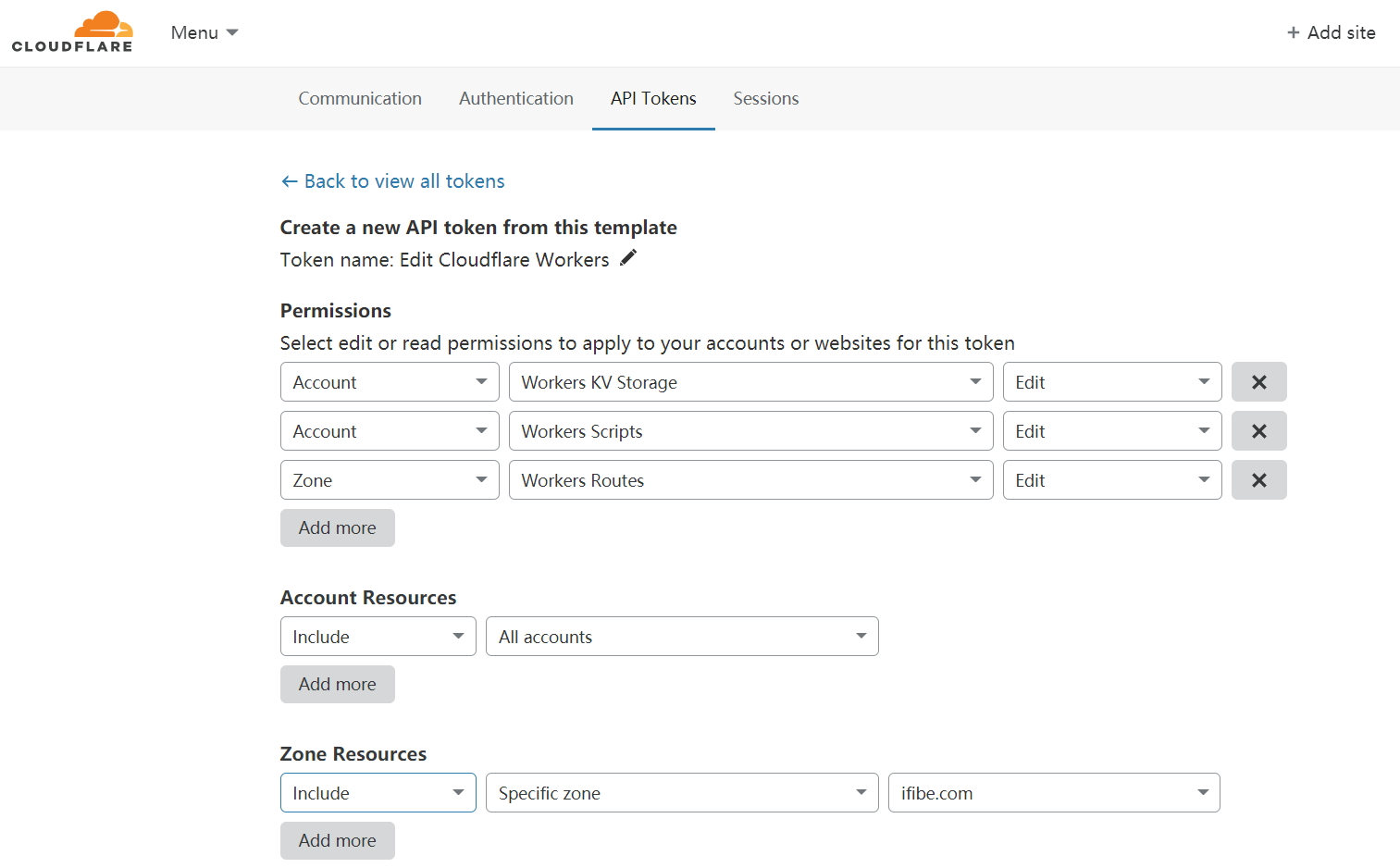
使用Cloudflare Worker 搭建 Hexo 个人博客教程 Cloudflare Worker 是 Cloudflare 提供的基于 Serverless 的云端服务,最新的 Workers Sites 允许使用者将博客程序如 Hexo、Wordpress 等部署到 Cloudflare 云端运行,算是新开发出来的奇技淫巧吧。本教程以 Hexo 部署为例,默认具有 Node 环境。安装 Cloudflare 提供的部署程序 Wrangler安装 WranglerWrangler 的项目地址:github.com/cloudflare/wrangler按照官方教程,使用 npm 安装 Wrangler ,在控制台输入$ npm i @cloudflare/wrangler -g #全局安装 $ # npm i @cloudflare/wrangler #如果默认环境无法进行全局安装,可以使用此局部安装命令,在工程目录需使用npx调用cargo 方式安装 Wrangler(未使用)$ cargo install wrangler获取 Cloudflare api 密钥在 Cloudflare 的 api 控制台 中创建一个新的 api-token,点击新建 api-token,选择使用模板(Start with a template)。使用 Edit Cloudflare Workers 模板创建新的 api,配置相应的权限即可获得一个新的 api-tokens,保存备用。配置 Wrangler 全局密钥控制台执行$ wrangler config输入刚才保存的 api-tokens 运行验证即可完成全部配置。初始化 Wrangler在工程目录终端中执行$ wrangler init --site my-static-site #my-static-site替换为要创建的Works名称# $ npx wrangler init --site my-static-site #局部安装使用此命令,用法如上执行此条命令会在工程目录中生成 wrangler.toml 和 aworkers-site, 其中 wrangler.toml 是工程中 Wrangler 的配置文件。配置 Wrangler简单设置 Wrangler.toml默认生成的 wrangler.toml 如下,可依据设置name = "site" #此处为之前初始化填写的Workes名称 type = "webpack" account_id = "" #这里填写自己的Workers ID,在Workers面板中查找 workers_dev = true route = "" #这里是个性化域名区域 zone_id = "" [site] bucket = "public" #这里填写Hexo程序默认的生成目录文件 entry-point = "workers-site"配置个性化域名这一步可以不填写,使用默认的 Workers 域名根据以下提示写入 wrangler.tomlzone_id = "42ef.."route = "example.com/*"设置自定义域名时,可以在 wrangler 配置完成后,在域名管理中的 Workers 设置中添加对应的 Workers 路由,再将 SSL 安全级别调整为 Flexible,否则会遇到 SSL 526 错误。上传全站到 Cloudflare Workers使用 Hexo 生成一次静态文件首先使用 Hexo 在工程目录生成一次静态文件,以产生 public 文件,如不生产则会下下一步上传中报错。上传 Public 到 Cloudflare控制台中运行$ wrangler publish提示以下即完成所有的运行操作。Using namespace for Workers Site "__site-workers_sites_assets" Uploading site files Success⬇️ Installing wranglerjs...⬇️ Installing wasm-pack... Built successfully, built project size is 11 KiB. Successfully published your script to https://*.workers.dev #这里就是生成的预览地址部署在 Workers 的 Hexo 演示程序:https://test.pv.workers.dev/ ,演示程序所生成的静态文件存储在对应的 Workers KV 中。注意事项注意,免费版本的 Workers Plan 有每天 100,000 次的访问限制(100,000 requests per day ),免费额度适合小站部署(流量大容易翻车),大站还是使用独立服务器或者收费版本部署稳一些。
-
-