

搜索到
2
篇与
的结果
-
 uPic 配置自定义图床教程 配置项说明API 地址: 后台服务 URL请求方式: 后台服务请求方式,支持POST和PUT文件字段名: 上传表单中的,文件对象的字段名扩展字段: Request Body。点击其他字段按钮进行配置请求头: Request Headers。点击其他字段按钮进行配置URL 路径: 上传完成返回的 JSON 中图片 URL 的获取路径。获取规则域名: 上传过后,访问服务器文件的 URL。保存路径: 文件储存的路径(包括文件夹)。 支持 {year} {month} {day} {hour} {minute} {second} {since_second} {since_millisecond} {random} {filename} {.suffix} 等变量。比如:上传的图片为 uPic.jpg,设定为 “uPic/{filename}{.suffix}”,则会保存到 “uPic/uPic.jpg”。在保存路径输入框后面的是网址后缀: 可以用于自定义图片处理。URL 获取规则Demo1{ "data": "http://xxx.png" } # 获取 ["data"]Demo2{ "data": { "url": "http://xxx.png" } } # 获取 ["data", "url"]Demo3{ "data": { "url": [ "http://xxx.png" ] } } # 获取 ["data", "url", 0]Demo4{ "data": [ { "url": "http://xxx.png" } ] } # 获取 ["data", 0, "url"]动态模板值{message type="success" content="扩展字段和请求头都支持以下动态模板来获取动态值"/}{filename}:会以上传时的文件名动态替换温馨提示1、请求头中的Content-Type 一定要设为 multipart/form-data; charset=utf-8;,否则很有可能服务端无法处理这个数据。2、接口返回的必须是包含图片地址的JSON文件,因为uPic是从这个文件里读取数据的,返回text无效。
 -
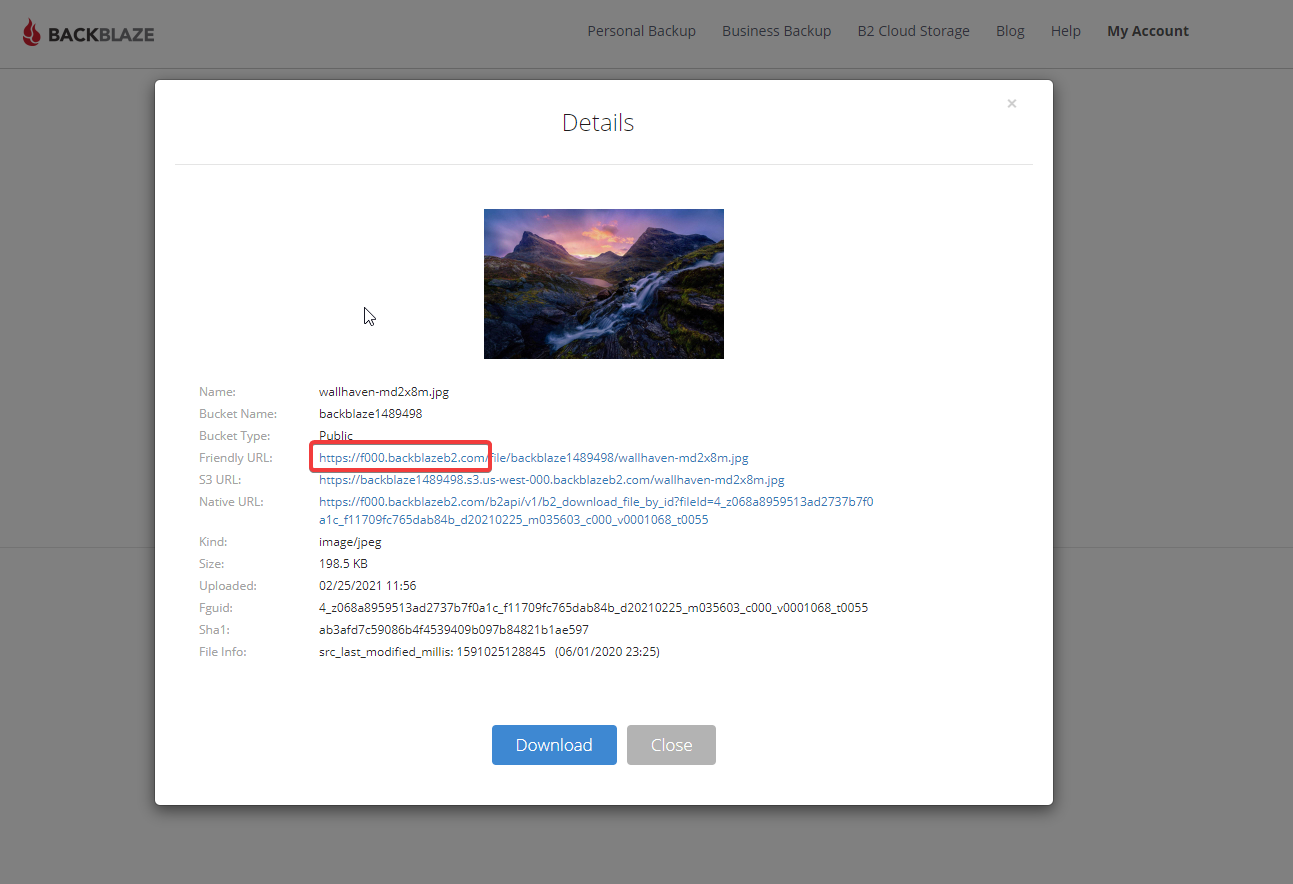
B2+cloudflare+ShareX,实现无成本图床和便捷上传 首先要准备好3个条件一个cloudflare账号 https://dash.cloudflare.com/一个B2账号 https://www.backblaze.com/b2/cloud-storage.htmlWindows软件ShareX步骤1、注册B2账号,点击进入B2 Cloud Storage,点击Buckets创建一个BUcket,设为public,并上传一个图片,记录下下图要用的域名2、点击App keys,添加一个新的key,bucket就选你刚创建的那个,记录下你的密钥,之后要在ShareX中用3、打开cf,cname一下上图要记的域名,小云朵点亮4、加一条页面缓存规则.5、创建一个workers,粘贴下列代码,记得b2domain和bucket的值改成自己的'use strict'; const b2Domain = 'img.domain.com'; // configure this as per instructions above const b2Bucket = 'bucket-name'; // configure this as per instructions above const b2UrlPath = `/file/${b2Bucket}/`; addEventListener('fetch', event => { return event.respondWith(fileReq(event)); }); // define the file extensions we wish to add basic access control headers to const corsFileTypes = ['png', 'jpg', 'gif', 'jpeg', 'webp']; // backblaze returns some additional headers that are useful for debugging, but unnecessary in production. We can remove these to save some size const removeHeaders = [ 'x-bz-content-sha1', 'x-bz-file-id', 'x-bz-file-name', 'x-bz-info-src_last_modified_millis', 'X-Bz-Upload-Timestamp', 'Expires' ]; const expiration = 31536000; // override browser cache for images - 1 year // define a function we can re-use to fix headers const fixHeaders = function(url, status, headers){ let newHdrs = new Headers(headers); // add basic cors headers for images if(corsFileTypes.includes(url.pathname.split('.').pop())){ newHdrs.set('Access-Control-Allow-Origin', '*'); } // override browser cache for files when 200 if(status === 200){ newHdrs.set('Cache-Control', "public, max-age=" + expiration); }else{ // only cache other things for 5 minutes newHdrs.set('Cache-Control', 'public, max-age=300'); } // set ETag for efficient caching where possible const ETag = newHdrs.get('x-bz-content-sha1') || newHdrs.get('x-bz-info-src_last_modified_millis') || newHdrs.get('x-bz-file-id'); if(ETag){ newHdrs.set('ETag', ETag); } // remove unnecessary headers removeHeaders.forEach(header => { newHdrs.delete(header); }); return newHdrs; }; async function fileReq(event){ const cache = caches.default; // Cloudflare edge caching const url = new URL(event.request.url); if(url.host === b2Domain && !url.pathname.startsWith(b2UrlPath)){ url.pathname = b2UrlPath + url.pathname; } let response = await cache.match(url); // try to find match for this request in the edge cache if(response){ // use cache found on Cloudflare edge. Set X-Worker-Cache header for helpful debug let newHdrs = fixHeaders(url, response.status, response.headers); newHdrs.set('X-Worker-Cache', "true"); return new Response(response.body, { status: response.status, statusText: response.statusText, headers: newHdrs }); } // no cache, fetch image, apply Cloudflare lossless compression response = await fetch(url, {cf: {polish: "lossless"}}); let newHdrs = fixHeaders(url, response.status, response.headers); if(response.status === 200){ response = new Response(response.body, { status: response.status, statusText: response.statusText, headers: newHdrs }); }else{ response = new Response('File not found!', { status: 404 }) } event.waitUntil(cache.put(url, response.clone())); return response; }6、workers里添加路由,使访问你的域名时,先走workers访问一下你的图片文件比如说一开始是https://f000.backblazeb2.com/file/backblaze1489498/wallhaven-md2x8m.jpg现在用https://dlcu.cf/wallhaven-md2x8m.jpg就可以访问了7、配置ShareX这个感觉没啥好说的,主页面–目标–上传目标设置–backblaze b2,填上就行了文章来自网络